|
Mitsumi FX4820
Mitsumi FX 4820:
Speedtest:
The first and for sure most important testfeature is the
CD-ROM speed. Our CD-ROM benchmark yields to the following results:
|
CD-size |
557348864 Byte |
|
Cache
size |
1265664 Byte |
|
Transfer
rate |
3726290 Byte/s
|
|
Reading
buffer |
1048576 Byte |
|
CPU
Load |
96,6 % |
|
Access
time (ms) |
|
minimal |
average |
maximal |
Steps |
|
forward |
41 |
90,6 |
114,3 |
46 |
|
backward |
48,6 |
91 |
166 |
54 |
|
total |
41 |
91 |
166 |
100 |
|
|
Speed
factor |
24,3x |
|
ROMarks |
7.9 |
|
CD-size |
672638976 Byte |
|
Cache
size |
1269760 Byte |
|
Transfer
rate |
1711429 Byte/s |
|
Reading
buffer |
1048576 Byte |
|
CPU
Load |
98,6 % |
|
Access
time (ms) |
|
minimal |
average |
maximal |
Steps |
|
forward |
50 |
281,6 |
3287,3 |
50 |
|
backward |
68,3 |
172 |
332 |
50 |
|
total |
50 |
226,6 |
3287,3 |
100 |
|
|
Speed
factor |
11x |
|
ROMarks |
3.3 |
The high value in the maximal Access time yields through the fact, that
the drive has in every test passage one sector in which the access time
was so high. The rest of the sector accesses were in the scope of 500 ms!
|
CD-site |
635211776 Byte |
|
Cache
size |
1269760 Byte |
|
Transfer
rate |
3171907 Byte/s |
|
Reading
buffer |
1048576 Byte |
|
CPU
Load |
97,6 % |
|
Access
time (ms) |
|
minimal |
average |
maximal |
Steps |
|
forward |
33,6 |
196,3 |
1754 |
52 |
|
backward |
44 |
118,6 |
279,3 |
48 |
|
total |
33,6 |
159 |
1754 |
100 |
|
|
Speed
factor |
20,6 x |
|
ROMarks |
4.8 |
- Test with scratched Original CD (Error-correcting test)
|
CD-size |
644210668 Byte |
|
Cache
size |
1267712 Byte |
|
Transfer
rate |
1261109 Byte/s |
|
Reading
buffer |
1048576 Byte |
|
CPU
Load |
98 % |
|
Access
time (ms) |
|
minimal |
average |
maximal |
Steps |
|
forward |
44,3 |
204 |
364,3 |
46 |
|
backward |
44 |
169 |
297 |
54 |
|
total |
44,3 |
184,6 |
364,3 |
100 |
|
|
Speed
factor |
8 x |
|
ROMarks |
3.7 |
In the following tables are the comparison of the Speedvalue mentioned
for a better survey.
The ROMarks, which are valued by the Access time
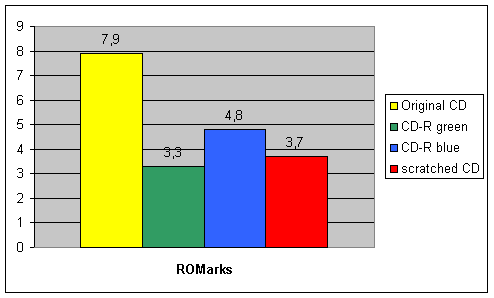
und the transfer rate valued by the Speed of the CD.-ROM
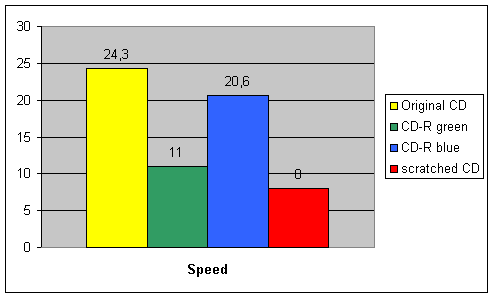
The graphics show a power fall off of about 70% in the case of
error-correcting. Such a fall off is not unusual for CD-drives, but it is
a negative effect for the drive. Also an enormous power fall off is marked
in the green CD-R test, indeed the blue CD-R test is much better.
The reached speed of 24,3-fold at the original-CD test is an average over
the whole CD. Because of the fact, that this drive is our first testdrive,
we can only compare the values with a benchmarktest of our own hardware,
especially our CD-drive ACD 361 from Artec. This drive reaches 6.9 ROMarks
and an average speed of 19-fold. Because of this fact, we can conclude
that the Mitsumi-drive is a little bit better than the Artec-drive, if we
consider the different high speeds.
Copy of an original CD:
For this testaspect we have copied a full original CD with 630 MB to
our harddisk drive and we were surprised. The CD-drive needs 8 min 50 sec
for the complete copy. The compare time of the Artec-drive is only 6 min
(!!), so the Artec-drive is about 3 minutes faster, although in the
high-speed it is nominally slower. We noticed, that the sound of the
Mitsumi-drive was low.
So we decided to make another test. This time we copied a Video-CD with
only one 700 MB track to the harddisk drive. Here the Mitsumi-drive could
reach its full speed. It needs only 2 min 23 sec, in comparison
Artec-drive needs exactly 3 min. The sound of the drive was now higher and
you can hear, that it really worked.
Summary:
In the speedtest the Mitsumi-drive should land in the middlefield, and
concerning the benchmarkresults it could be a little bit better valued,
but the copytest was bad. The drive can only reach its high speed if it
copies large files. In the 'normal' use this case is rare, you will often
copy a lot of small files, for example at a software installation .
Previous
Next
Copyright
by All-About-PC. All rights reserved.
All information on this website is protected by international law. Any
reproduction or publication without the agreement of the editorial
office is prohibited. Please respect the work of others.
Although all information on this website is hardly recherched and
mostly checked and confirmed from secondary side, we do not take the
responsibillity for any damage originated from the use of the
information on our site. |
|